How-to
How to run a usability test with five people
How to run a usability test with five people: write realistic tasks, recruit the right participants, watch without helping, then fix and test again.
· 6 min read · Musab Alfawal
On this page
A usability test is simple to describe. You give someone a realistic task, watch them try it with your design, and note where they hesitate, take a wrong turn or give up. To run a usability test you don’t need a lab or a big budget. You need something people can click through, a handful of people who match your users, and up to an hour with each of them.
The handful is five. That number comes from Jakob Nielsen’s article “Why You Only Need to Test with 5 Users”, published by Nielsen Norman Group in 2000. This guide covers why five works, how to write tasks that don’t give the answer away, and how to run sessions you can learn from.
What happens in a usability test
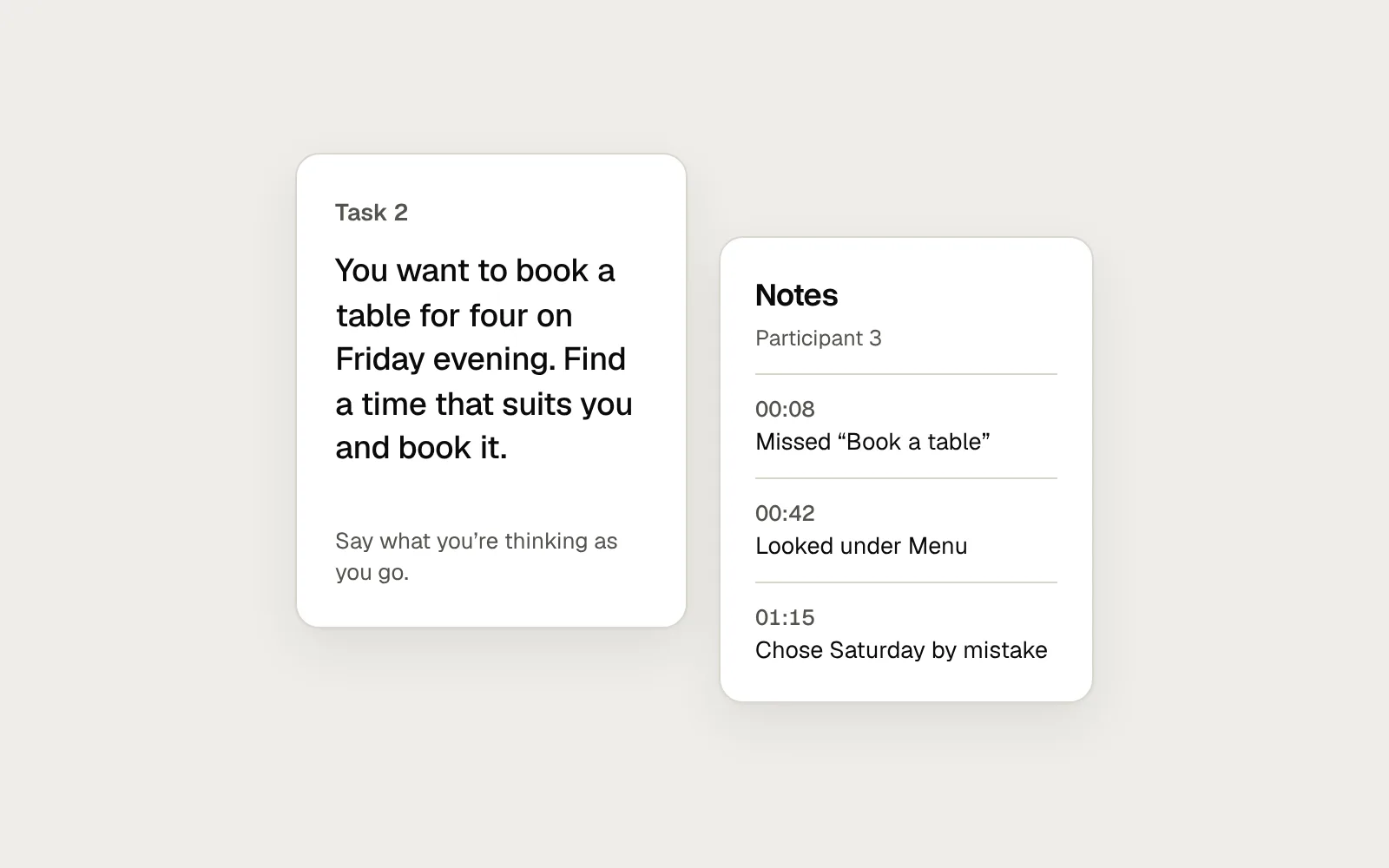
Each session has one participant, one moderator and, if you can, one note-taker. The participant reads a task and tries to complete it while saying what they are thinking. The moderator stays mostly quiet. The note-taker writes down what happens, with the time, so each moment is easy to find in the recording afterwards.
Good notes describe behaviour. “Struggled a bit” doesn’t help when you sit down to decide what to fix. “00:42 looked for times under Menu” does, because it tells you where people expected to find something.
One task, and what the note-taker writes down while it happens.
How to write usability test tasks
The wording of a task decides what the test can tell you. If the task says “Click Pricing”, you are testing whether people can match a word on the card to a word on the screen. You learn nothing about whether they would have looked there in the first place.
A good task is a short scenario. It gives a reason to act, a goal in the participant’s own words and enough context to make choices. It leaves out the labels, menu names and button text in your interface, so finding them is part of the test.
Before
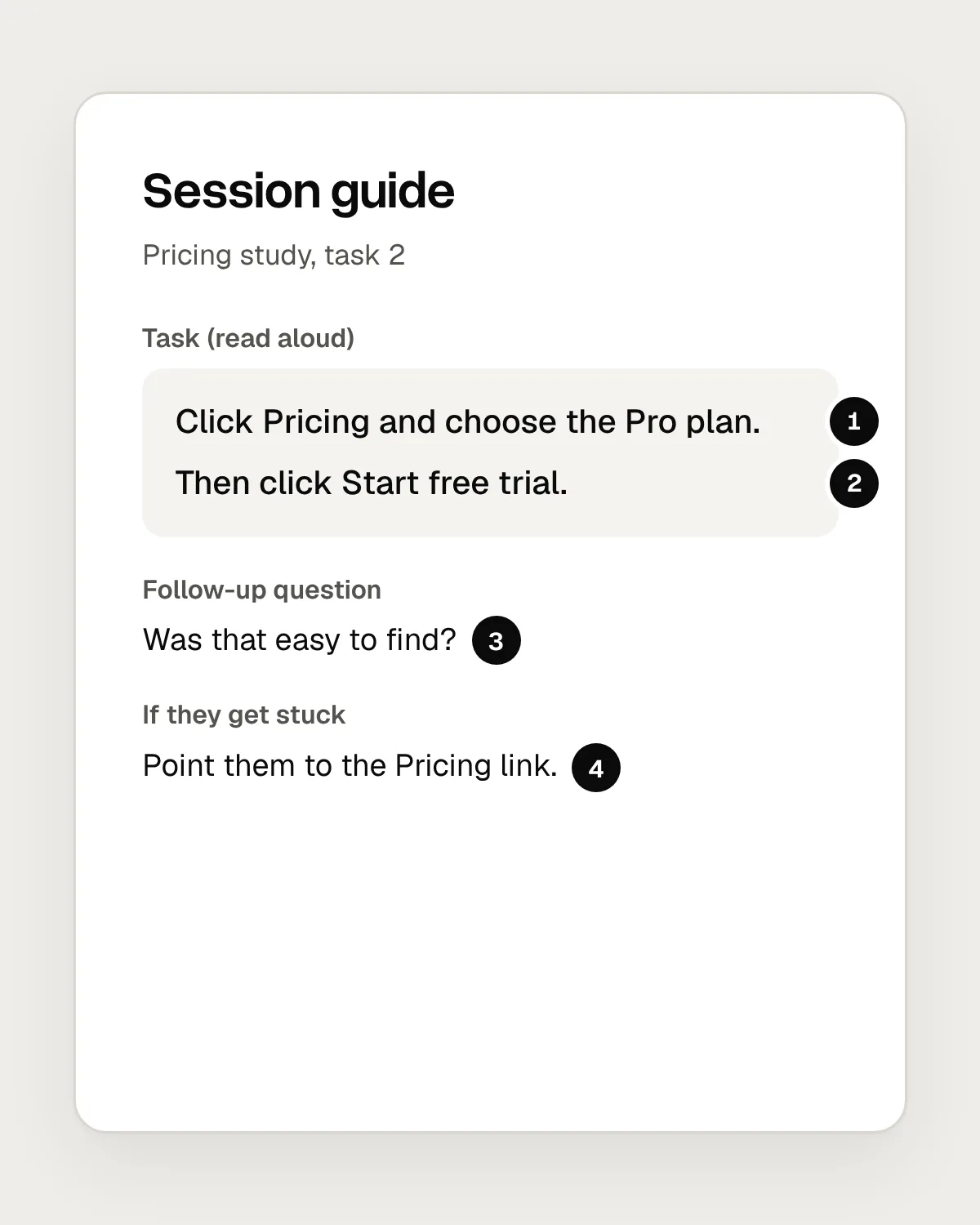
- It names the link to click, so people only have to match a word.
- Step-by-step directions. You never see which way people would go on their own.
- A yes-or-no question invites a polite yes.
- Pointing them to the link rescues them, and hides where they got stuck.
After
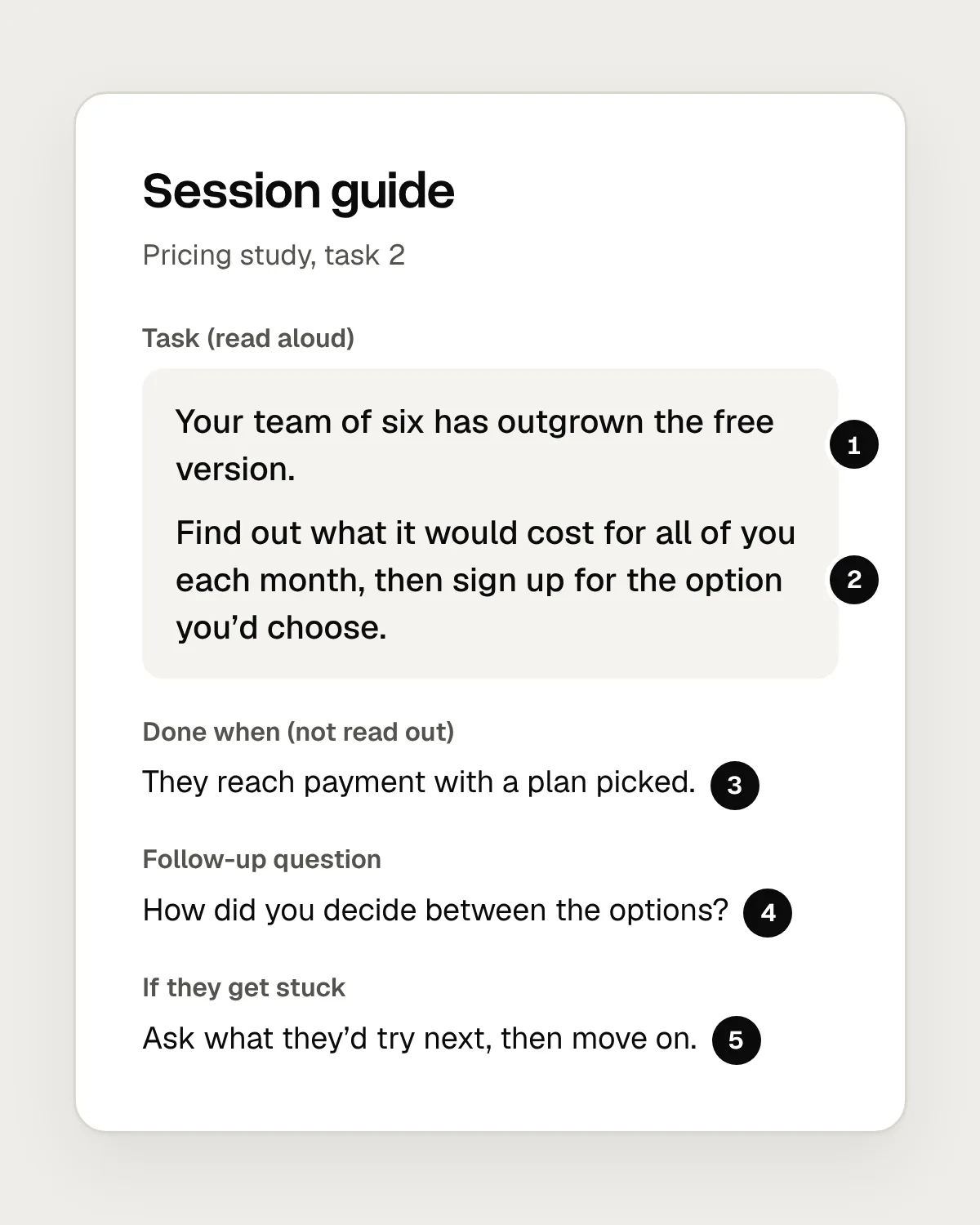
- Context: who they are and why they are here.
- A goal in their words, with no menu names or button labels.
- What counts as done. This is for you, and isn’t read out.
- An open question about what they did and why.
- Getting stuck is a finding. Note it, then move on.
How many users do you need for a usability test?
For a qualitative test, where the aim is to find problems and understand why they happen, five people per round is usually enough. Nielsen’s argument is that the first person you watch shows you a lot, the second repeats much of it and adds a little, and by the fifth you are mostly seeing problems you already know about. Adding more people to the same round costs time and teaches you less each time.
The better use of that time is another round. Fix the problems you found, then test the new version with five more people. Each round shows whether the fixes worked, and turns up problems the first ones were hiding. That is why several small tests teach you more than one large one.
Five is a rule for qualitative testing only. If you need numbers, such as a success rate, a time on task or a confident comparison between two designs, you need many more participants and a different kind of study. And if your users fall into groups that behave very differently, such as buyers and sellers, include people from each group.
How to run a usability test, step by step
1. Decide what you need to learn
Write down two or three questions the test should answer, such as “Can people find out what a team plan costs?” They decide which tasks you write and which parts of the design need to be ready.
2. Recruit five people who match your users
Find people who would really use the product, with similar needs and experience. Colleagues and friends know too much and are too kind. Screen for behaviour, like “booked a restaurant online in the last month”, rather than age or job title alone.
3. Write three to five scenarios
One for each question, in plain language, with no interface words. For each, decide privately what counts as done.
4. Try it on a colleague first
Run the whole session once with someone from your team. It shows you unclear tasks, a prototype that breaks halfway through and a script that runs too long, before a real participant finds them.
5. Run each session
Explain that you are testing the design and that they can’t do anything wrong. Ask them to think aloud. Then read out the first task and stay quiet. If they ask you a question, ask what they would do if you weren’t there.
6. Debrief the same day
After each session, spend a few minutes with your note-taker listing what you saw. After the last one, group the problems and rank them by how many people hit them and how badly they were stuck.
7. Fix the top problems and test again
Change the design, then run another round with five new people. Keep going until the problems that are left are small.
Think aloud, and don’t rescue
Thinking aloud is the heart of the method. When people say what they are looking for and what they expect to happen, you learn why they went the wrong way, and that tells you what to change. Most people go quiet now and then. A neutral prompt like “What are you thinking now?” is enough to get them talking again.
The hardest part of moderating is staying quiet. When someone is lost, every instinct says to help, and each time you point, hint or explain, you remove the problem you were there to see. If they ask whether they are doing it right, say there is no right way and ask what they would try next. If someone is truly stuck, note where, and move on to the next task.
Watch what people do as well as what they say. Someone may struggle through a task and then call it easy, out of politeness or embarrassment. A note that says “took three wrong turns, then said it was easy” is more useful than either half on its own.
Before the first session: a checklist
Questions people ask
Is testing with five users really enough?
For finding usability problems in a qualitative test, yes, as long as you test again after fixing what you find. It isn’t enough for statistics, such as success rates or a comparison between two designs. You also need more people if your users fall into very different groups.
Can you run a usability test remotely?
Yes. A moderated session over a video call works for most screen-based products. You see the participant’s screen and hear them think aloud, much as you would in a room. Test the call and the screen sharing with a colleague first.
What should you do when a participant asks for help?
Turn the question back to them: “What would you do if I weren’t here?” If they are truly stuck, note where and why, and move on to the next task. You can show them the answer once the session is over.
Resources
- Why you only need to test with 5 users · Nielsen Norman Group
The 2000 article behind the number five, and where it stops applying.
- Thinking aloud: the #1 usability tool · Nielsen Norman Group
Why thinking aloud works, and how to keep people talking.
- Turn user goals into task scenarios for usability testing · Nielsen Norman Group
How to write tasks that don’t give the answer away.
- Using moderated usability testing · GOV.UK Service Manual
Planning and running sessions, with advice on writing tasks.
- Doing user research remotely by phone or video call · GOV.UK Service Manual
Practical advice for remote sessions.
If this was useful, share it with someone it would help.